Pipette Show: Lighting Up the Wells

Pipetting into microplates is still done by hand in many labs, and a single mix-up between two wells can invalidate an experiment. Pipette Show turns a plate layout into an efficient sequence of pipetting steps and then guides each step by lighting up the target well on a tablet under the plate. It runs in any modern browser, works with any pipette and any tablet with a screen of 8 inches or more, and is open source.
Quicklinks
- Paper (2022): Pipette Show: An Open Source Web Application to Support Pipetting into Microplates — ACS Synthetic Biology (open access)
- Source code: github.com/Global-Biofoundries-Alliance/pipette-show (MIT license)
Anyone who has ever filled a 96-well plate by hand knows the problem. The protocol looks simple: a specific volume of water here, that much primer there, and the template DNA in a gradient across the rows. The execution is not. Manual pipetting is a measurable source of imprecision even under ideal conditions (Lippi et al., 2017), and after a few dozen steps concentration drops: it is easy to skip a well or lose track of which column is already done. A single mix-up can quietly invalidate the whole plate.
Liquid-handling robots solve this problem, but not every lab has one, and for a small test series or a proof of concept, setting up a robot workflow often takes longer than pipetting by hand. In many labs, especially low-resource ones, manual pipetting is simply the only option.
Together with Marc Mendler and Johannes Kabisch, I developed Pipette Show. It offers a web interface to plan the pipetting steps and then guides the person at the bench through them, one well at a time, by lighting up the target well from below.
- The problem: manual pipetting into microplates is still often indispensable, but planning an efficient sequence is time-consuming and executing it is error-prone.
- Two modules: the Build module, used on a computer, turns a plate layout into a sequence of pipetting steps. The Show module, running on a tablet under the plate, lights up the target well and shows substance and volume for each step.
- Smarter step order: an algorithm groups wells with the same volume to reduce how often the pipette has to be readjusted, and takes multichannel pipettes into account.
- No vendor lock-in: unlike commercial solutions, Pipette Show works with any pipette and runs in any modern browser on a tablet with a screen of at least 8 inches.
- Free and open source (MIT license), built with Vue.js 3 and designed to be extended with new algorithms, plate formats and import filters.
From a hackathon idea to a tool
The idea dates back to the 2018 RoboWorkshop hackathon, where one of the topics was how to make laboratory work more reliable. Guiding pipetting by backlighting wells is not a new concept in itself. Gilson and Thermo Fisher Scientific offer apps that work with their own electronic pipettes, BioSistemika sells PlatR as a bundle of app, tablet and accessories, and with iPipet there was already a free tool that displays pipetting instructions from an uploaded CSV file (Zielinski et al., 2014).
What was missing was a tool that covers the whole workflow, from designing the plate layout to executing it, without being bound to a specific pipette or device, and that anyone can adapt to their own lab. That is the gap Pipette Show was built to fill.
The Build module: planning the experiment
The Build module is where experiments are designed, ideally on a computer. A progress bar guides the user through a few pages:
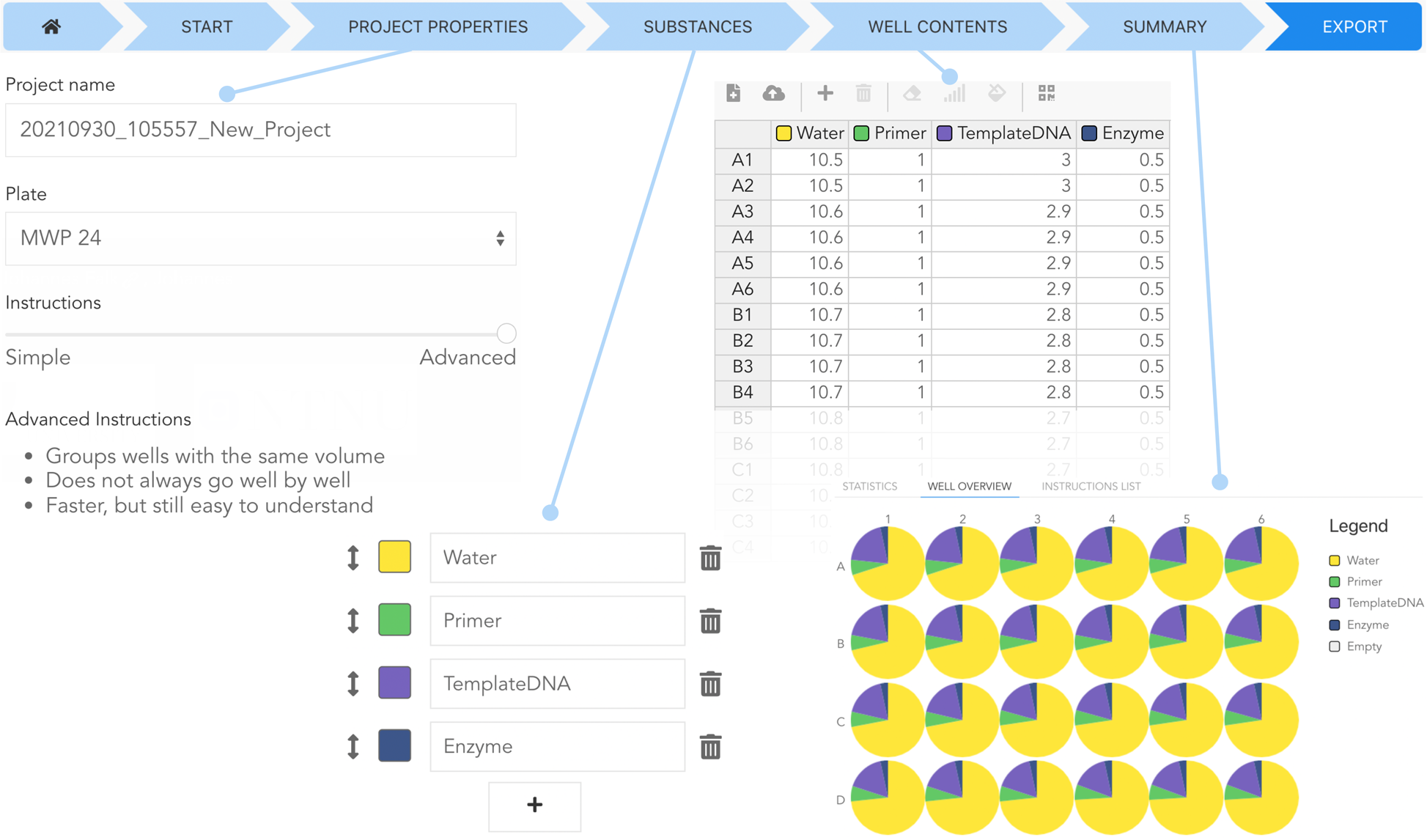
- Start: create a new experiment, open an existing Pipette Show file, or import one. Supported formats are CSV and Excel files as well as protocols from the DIVA dispensing module and the Opentrons Protocol Designer.
- Project properties: choose a name, the plate format (24, 96 or 384 wells) and the algorithm that turns the layout into pipetting steps.
- Substances: add, rename and reorder the substances. Each gets a colour, which is later used to light up the wells.
- Well contents: a spreadsheet with one row per well and one column per substance. Gradients and backfill (topping up every well to the same total volume) can be generated automatically.
- Summary and export: an overview of every well and a preview of the generated instructions. The Simple algorithm proceeds substance by substance and well by well, just like the conventional workflow. The Advanced algorithm groups wells that receive the same volume of a substance, so the volume setting of the pipette has to be changed less often. If a multichannel pipette is available, it also takes that into account for plates with 96 wells or more.
The finished experiment can be exported as a file or saved to Google Drive. The most convenient way is a QR code: scan it with the tablet, and the experiment opens directly in the Show module.
The Show module: one well at a time
The Show module is meant to run on a tablet. The microplate sits directly on the screen, and a one-time calibration adapts the display to the real size of the plate by dragging its corners. A parametric 3D-printable holder for the plate is provided as a SCAD file.
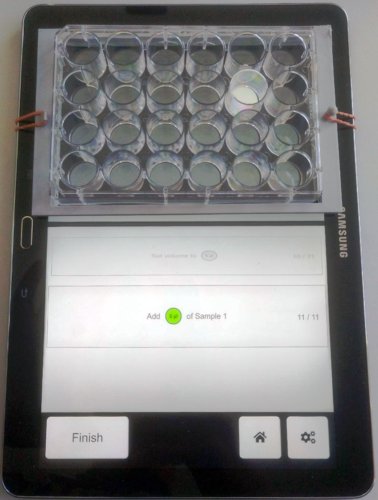
During the run, the well to be filled lights up in the colour of the current substance. Below the plate, the current instruction is shown together with the previous and the next step, and the app announces when the substance or the volume changes. One tap advances to the next step. Steps can be undone, the plate size can be readjusted, and all buttons can be mirrored for left-handed users.
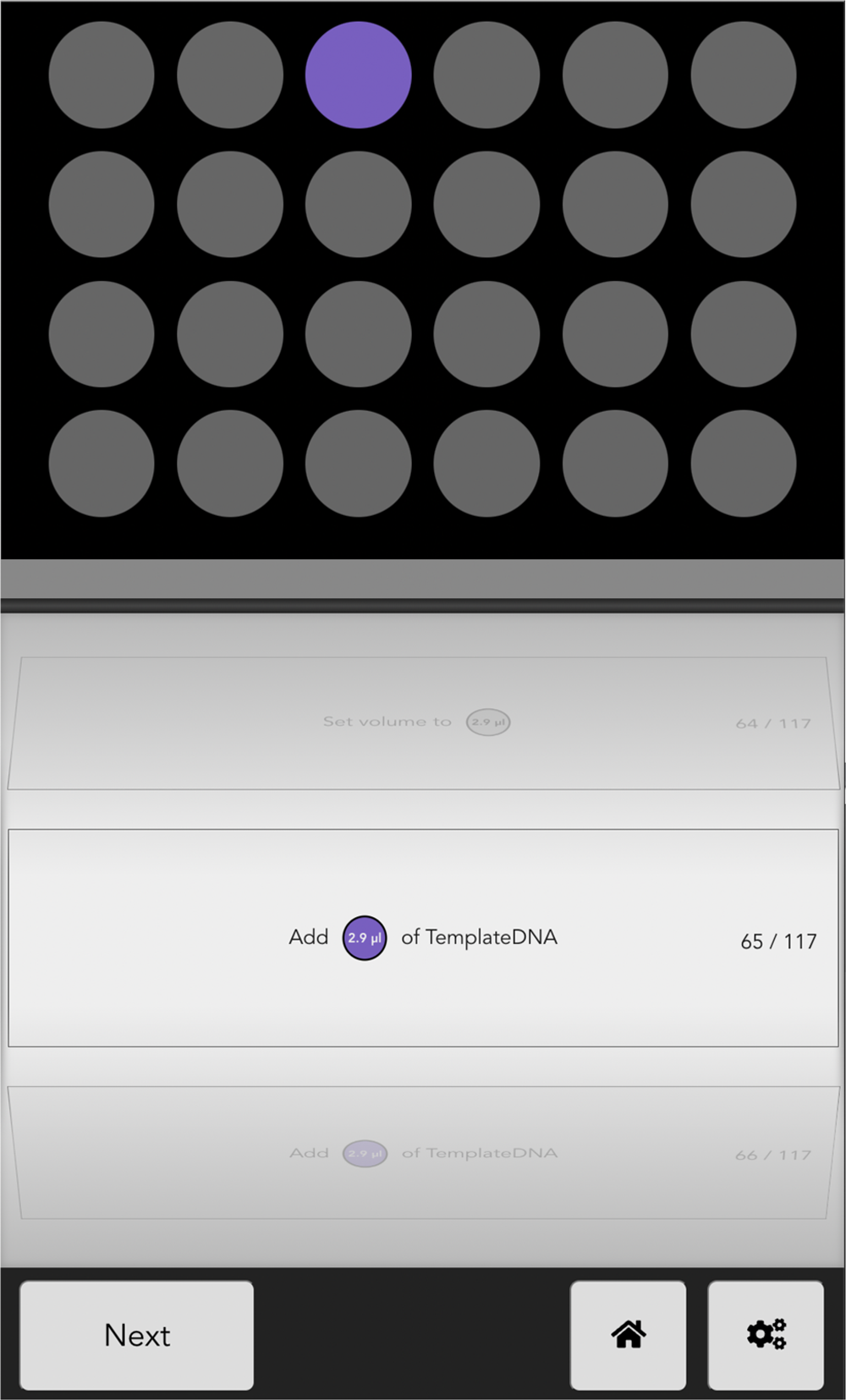
As a result, the person pipetting no longer has to keep the plan in mind or look back and forth between a printed layout and the plate. The question “which well is next?” is answered by the backlight.
Under the hood
Pipette Show is a client-side application written in Vue.js 3. Everything runs in the browser, which is what makes it device-independent: it works on any reasonably modern tablet, and it can be served from any web server, including a local one, for instance in labs that want to keep their protocols in a private cloud.
The code is organized into modular libraries with distinct responsibilities: algorithms that generate instructions, tools that manipulate data, and import filters for different file formats. Adding a new step-ordering algorithm or a new plate format does not require touching the rest of the application. After an alpha version, we ran a user survey and, based on the feedback, added support for 8- and 12-channel pipettes and changed the colour of the backlighting.
For me, Pipette Show was a deliberate change of perspective from my usual research code. A tool that is used at the lab bench has different requirements than a statistical-physics simulation: the interface has to be self-explanatory, the workflow has to survive incorrect input or an accidental page reload without losing progress, and the data formats have to fit what the lab already uses.
Frequently Asked Questions
What is Pipette Show?
A free, open-source web application for manual pipetting into microplates. It converts a plate layout into a sequence of pipetting steps and then guides their execution on a tablet by lighting up the target well under the plate and showing substance and volume for each step.
Which hardware do I need?
A computer for planning and a tablet with a screen of at least 8 inches for the guidance. Pipette Show runs in the browser and works with any manual pipette, including 8- and 12-channel pipettes. Unlike commercial solutions, it is not tied to a particular pipette brand.
Which plate formats and file formats are supported?
24-, 96- and 384-well plates. Experiments can be imported from CSV and Excel files as well as from protocols created with the DIVA dispensing module or the Opentrons Protocol Designer, and exported as CSV or as Pipette Show files (a JSON-based format), via Google Drive, or by QR code.
How does Pipette Show reduce pipetting errors?
By removing the need to keep track of the plan. Only the well that has to be filled next is lit, in the colour of the substance, and the instruction shows the volume to dispense. Changes of substance or volume are announced explicitly, and the Advanced algorithm reduces the number of volume changes in the first place.
Can I extend Pipette Show?
Yes, contributions are welcome. The code is MIT-licensed and structured into modular libraries, so new instruction algorithms, plate formats or import filters can be added without changing the rest of the application. Development, feature requests and bug tracking happen in the public GitHub repository.
References
- Lippi, G., Lima-Oliveira, G., Brocco, G., Bassi, A., Salvagno, G. L., 2017. Estimating the intra- and inter-individual imprecision of manual pipetting. Clin. Chem. Lab. Med. 55, 962–966. https://doi.org/10.1515/cclm-2016-0810
- Zielinski, D., Gordon, A., Zaks, B. L., Erlich, Y., 2014. iPipet: sample handling using a tablet. Nat. Methods 11, 784–785. https://doi.org/10.1038/nmeth.3028